
TL;DR:
- Small businesses often remain vulnerable to security breaches due to process failures, such as outdated access revocations, rather than hardware issues.
- Implementing modern, role-based access control with logging, MFA, and regular audits enhances security, compliance, and operational efficiency.
- Consistent process discipline and professional system management maximize the return on investment in access control measures.
Most small businesses spend money on locks, cameras, and alarms, then experience a breach not because the hardware failed, but because a former employee still had access three weeks after leaving. That is the uncomfortable reality of security in small commercial properties. Real risk comes not just from weak technology, but from weak daily habits and broken processes. This guide gives you a plain, step-by-step look at what effective access control actually requires, covering both the systems and the procedures that keep your business protected and compliant in 2026.
Table of Contents
- Why traditional security falls short for small businesses
- Core components of effective access control for small business
- Access control and compliance: What small businesses need to know
- Common pitfalls: Where access control breaks down
- Building your access control strategy: Step-by-step for small business
- The hidden ROI of thoughtful access control
- Next steps: Secure your business with the right access control
- Frequently asked questions
Key Takeaways
| Point | Details |
|---|---|
| Modern access goes beyond locks | Effective access control includes both hardware and robust processes for permissions, reviews, and removals. |
| Combine security and compliance | Meeting legal and risk requirements means blending technical controls (like RBAC and MFA) with documented policies and regular audits. |
| Routine reviews prevent gaps | Regular permission and access audits stop privilege creep and catch critical lapses like lingering credentials after staff changes. |
| Pro tips avoid costly pitfalls | Mistakes like shared access or bad offboarding undermine systems—set up clear procedures and training. |
| Business benefits add up | Better access control reduces downtime and operating costs while building customer trust and business resilience. |
Why traditional security falls short for small businesses
Traditional security relies heavily on physical keys and standalone locks. These tools feel familiar and simple. But they create serious problems that most small business owners do not notice until something goes wrong.
A standard key offers zero tracking. You have no way to know who entered your supply room at 7 p.m. on Tuesday or whether someone made a copy of the key you handed out two years ago. When an employee leaves, you must physically collect their key, which does not always happen. When a key is lost, you pay to rekey the lock. These costs and risks add up fast.
Process failures are often the bigger culprit. The operational compliance value of a system depends on how it is managed day to day. As security professionals consistently find, the biggest failures usually occur in the process, not just the hardware.
Common process gaps in small businesses include:
- Shared keys or codes passed between multiple employees without records
- Doors propped open for convenience during busy periods
- No formal procedure to revoke access when someone leaves or changes roles
- Access credentials given out informally and never tracked
Modern access control systems address these gaps directly. They create digital logs of every entry attempt, allow you to set permissions for specific people on specific doors, and let you revoke access instantly from a web portal or mobile app. For businesses with multi-tenant access challenges, such as shared office buildings or mixed-use properties, this kind of precision is not optional. It is essential.
Traditional locks protect a door. Access control protects your business by giving you visibility, control, and evidence all in one system.
The shift from hardware-only thinking to process-plus-technology thinking is the first step toward real security.
Core components of effective access control for small business
Once you understand why old methods fall short, the next step is knowing what a solid access control setup actually includes. These are not just features on a product sheet. They are functional elements that work together to reduce risk and support compliance.
Role-based access control (RBAC) assigns permissions based on job roles rather than individual names. If you have a warehouse team, all warehouse staff get access to the loading dock but not the server room. When someone joins that team, they get the right access automatically based on their role. When they leave, revoking one profile handles everything.
The recommended methodology for small businesses is least privilege via RBAC, plus regular audits to prevent privilege creep. Privilege creep happens when an employee collects access permissions over time as they move between roles, ending up with far more access than their current job requires.
Least privilege is simple: every person only gets the minimum access needed to do their job. Nothing more. This reduces your exposure if any credential is ever compromised.

Multi-factor authentication (MFA) requires a second form of verification beyond a password or keycard. This could be a PIN, a mobile app prompt, or a biometric scan. If someone steals a keycard, MFA stops them at the door.
Access logs record every entry and exit event. They show you who accessed what area, at what time, and whether any attempt was denied. Logs are critical for spotting unusual patterns and for proving compliance during an audit.
Here is a comparison of traditional and modern access control approaches:
| Feature | Traditional locks and keys | Modern access control |
|---|---|---|
| Audit trail | None | Full digital log |
| Permission changes | Physical rekeying | Instant via software |
| MFA support | No | Yes |
| Remote management | No | Yes |
| Role-based permissions | No | Yes |
| Compliance documentation | Manual, if at all | Automated |
Pro Tip: Start auditing your permissions list every 90 days. Remove any accounts that belong to former staff or that have not been used in the past 60 days. This single habit closes more gaps than most technology upgrades.
For businesses exploring cloud-based access control, the advantage is that you can manage all doors from a single app, whether you are on-site or traveling. Educational institutions have applied this model successfully, and the same principles covered in school access strategies apply directly to commercial properties.
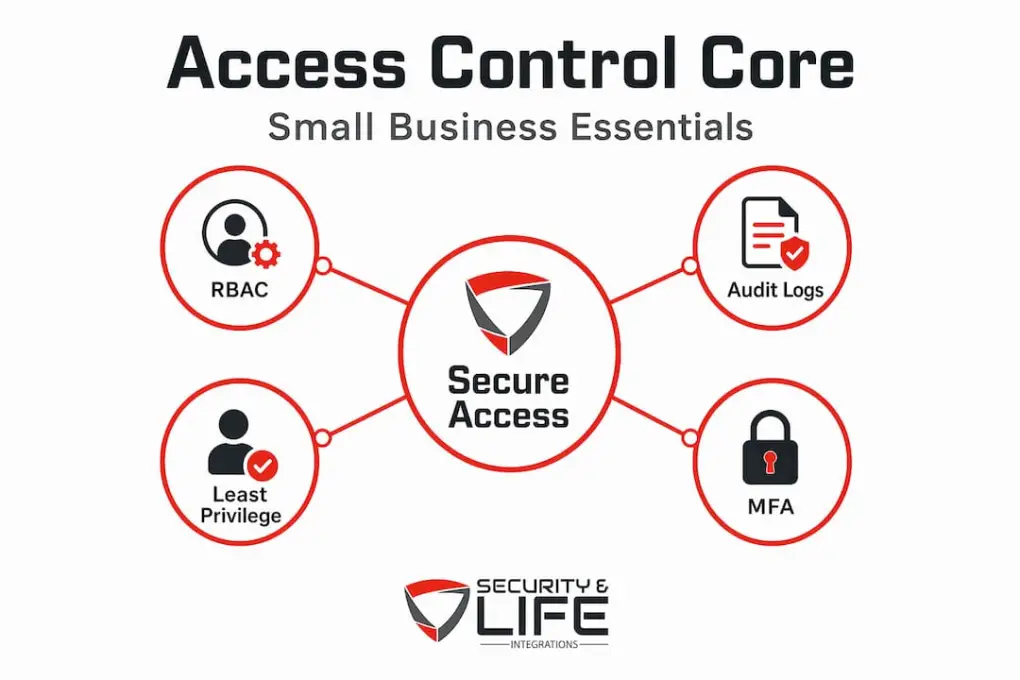
The FTC Safeguards checklist also identifies these exact components as the baseline for businesses handling consumer financial data. That tells you these practices are not industry-specific advice. They are the floor, not the ceiling.
Access control and compliance: What small businesses need to know
Security systems and compliance often feel like separate concerns. They are not. The tools you use to manage physical and digital access are often the same ones regulators want to see documented.
Depending on your business type, several regulations may apply. The FTC Safeguards Rule, for example, applies to a wide range of businesses that handle consumer financial information, including auto dealers, mortgage brokers, tax preparers, and other service businesses. Under this rule, access controls are expected in written security programs, covering MFA, access limits, logging, and periodic reviews. You should always verify your obligations with legal counsel, since requirements can vary.
Here is what compliance-related access control documentation typically includes:
- A written access control policy that defines who can access what and why
- Records of how permissions are assigned, changed, and revoked
- Logs showing access events over a defined retention period
- Documentation of regular audits and their outcomes
- Evidence that MFA is active on systems touching sensitive data
A useful way to structure your compliance readiness is through a data table that maps each element to its purpose:
| Compliance element | What it requires | Tool or process |
|---|---|---|
| Written policy | Documented access rules | Policy document, reviewed annually |
| Access logs | Record of all access events | Log management software |
| Periodic review | Regular audit of permissions | Quarterly access audit |
| MFA enforcement | Second verification required | Hardware token, mobile app, or biometric |
| Revocation process | Access removed at role change | Offboarding checklist tied to HR |
Benchmark reporting often ties risk reduction to credential and access controls like MFA. The impact is real: organizations with strong access discipline report measurably fewer incidents. For small businesses managing physical locations with sensitive data, the combination of digital and physical access control is where compliance and security converge.
For property managers, the same compliance logic covered in property management security applies to tenant data, visitor records, and entry logs across shared facilities. The facilities compliance strategies used by larger organizations scale down effectively to small and mid-size commercial properties.
Common pitfalls: Where access control breaks down
Even businesses that invest in modern systems run into failures. Most of them are not technology failures. They are process failures that a good system cannot fix on its own.
Understanding these failure points helps you prevent them. The most common edge cases undermining access control include tailgating, shared credentials, propped doors, credential lingering after a role change, and poor offboarding.
Here is what each of these looks like in practice:
- Tailgating: One authorized person badges in, and a second person follows through without authenticating. This is common in busy lobbies or near loading docks.
- Shared credentials: Employees share keycards or PINs so they do not have to wait for their own access to be set up. This eliminates accountability entirely.
- Propped doors: A door is left open for convenience during a delivery or cleaning shift. Anyone can walk in.
- Lingering credentials: A former employee’s badge is never deactivated. Their access remains live for days, weeks, or months after they left.
- Slow permission updates: An employee moves from the operations team to sales, but their server room access is never removed.
The managing room permissions process needs to be tied directly to HR changes. If your access system is disconnected from your onboarding and offboarding workflow, you will always have a gap.
Physical behavior is equally important. Systems that include door prop alarms address the propped door problem directly by alerting your team when a secured door has been held open too long. That immediate alert closes a gap that no amount of policy writing can solve on its own.
Pro Tip: Create a monthly offboarding audit. Pull a report from your access control system and cross-reference it against your current employee list. Any account that does not match an active employee should be deactivated immediately.
Building your access control strategy: Step-by-step for small business
Theory and compliance requirements matter, but what you need is a clear plan of action. These steps follow the standard framework used by security professionals: start with risk identification, implement authentication controls, define permissions, then continually monitor and update.
-
Inventory all access points. Walk through your property and list every door, gate, server room, and digital system that requires access. Include physical doors and software platforms. You cannot control what you have not mapped.
-
Categorize areas by sensitivity. Group access points by risk level. A public-facing lobby is different from your accounting office or server room. Each category will get a different permission level.
-
Assign RBAC roles based on job duties. Map your current job roles to the access they actually need. Do not start with what people currently have. Start with what they need to do their job. These two lists are often very different.
-
Enable MFA on all sensitive areas and systems. Any access point connected to financial data, personal information, or critical operations should require a second verification step.
-
Set up access logging and monitoring. Make sure your system records every access event and that someone reviews the logs on a regular schedule. Set up alerts for denied access attempts, after-hours entries, or door prop events.
-
Create a formal audit schedule. Run a full permissions review at least every 90 days. Document the findings and any changes made. This documentation becomes your compliance evidence.
-
Tie access changes to HR processes. Every hire, termination, and role change should trigger a specific access update. This needs to be a standard operating procedure, not something that happens when someone remembers.
For organizations with unique entry challenges, the approach used in securing churches and community buildings shows how RBAC and scheduled access can work even in environments with large, rotating visitor populations. The same principles apply to retail, professional services, and light industrial spaces.
Pro Tip: Assign one person as your access control owner. This does not have to be a full-time role, but someone needs to be responsible for keeping permissions current, running audits, and updating policies when the business changes.
The hidden ROI of thoughtful access control
Most conversations about access control focus on preventing breaches. That is valid. But the return on investment goes further than most small business owners expect.
Consider the operational savings alone. Access control can lower rekeying and operational disruption costs significantly compared to traditional key management. Each time an employee leaves under traditional systems, you face a decision: rekey the locks or accept the risk. With a modern system, deactivating a credential takes seconds and costs nothing.
Onboarding and offboarding become faster and more consistent. New employees get the right access on day one, tied to their role. Departing employees lose access at the moment HR closes their file. This reduces the window of risk on both ends of employment.
There is also the question of internal trust and accountability. When people know that access is logged, behavior changes. Not because employees are assumed to be dishonest, but because clear systems reduce gray areas and accidental mistakes. Fewer errors mean less time spent investigating incidents.
Customer and client trust is another factor. If your business handles sensitive information, being able to show clients that you have documented access controls in place is a professional differentiator. It signals that you take data protection seriously, which matters more in 2026 than it did five years ago.
Choosing between a cloud-based subscription model and an on-premises system affects your long-term cost structure. As the guide on balancing security and convenience shows, the right model depends on how your business is structured and how quickly it changes. A subscription model scales with growth. An on-premises system may suit a stable, single-location business better.
Long-term process discipline is the multiplier here. The best system in the world produces weak results if the process around it is loose. The businesses that get the most out of access control are the ones that treat it as an ongoing operational practice, not a one-time installation.
Next steps: Secure your business with the right access control
Getting the right access control system in place is straightforward when you work with professionals who understand both the technology and the operational side of small business security.
Security & Life Integrations designs and installs access control solutions tailored to commercial properties of all sizes. Whether you manage a single office location or a multi-tenant commercial property, the right system integrates logging, permissions, and compliance documentation into a single, manageable platform. The team at Security & Life Integrations provides 24/7 support and can help you assess your current setup, identify gaps, and implement a solution that fits your specific risk profile and budget. Reach out today to schedule a security review or a system demonstration for your property.
Frequently asked questions
What is the difference between access control and traditional locks?
Modern access control includes logging and permissions management, while traditional locks only provide physical resistance with no tracking, no audit trail, and no simple way to revoke access remotely.
Do small businesses need to comply with access control regulations?
Some small businesses are legally required to implement access controls, particularly those handling consumer financial data. Regulations like the FTC Safeguards Rule apply to a broader range of businesses than most owners expect, so reviewing your obligations with a legal professional is always the right call.
What are the most common mistakes with access control in small business?
Shared credentials, failing to remove former employee access promptly, and leaving doors propped open are the top failure points. As noted in practical field experience, edge cases like propped doors and poor offboarding processes undermine even well-designed systems.
How does multi-factor authentication (MFA) improve access security?
MFA requires a second verification step beyond a password or keycard, which means a stolen credential alone is not enough to gain entry. MFA reduces compromise risk tied to password and credential theft, making it one of the highest-impact controls a small business can implement.